

 Login
Login|
Smart Linux ZeroClient
Transform Linux Desktops Into Smart ThinClientsConvert Rocky Linux 10 Workstations into cloud-managed, centralized thin clients with just one command. Eliminate legacy Windows workstation maintenance costs and simplify desktop management. 1 CommandInstant Conversion 100%Cloud Managed Rocky 10Enterprise Base 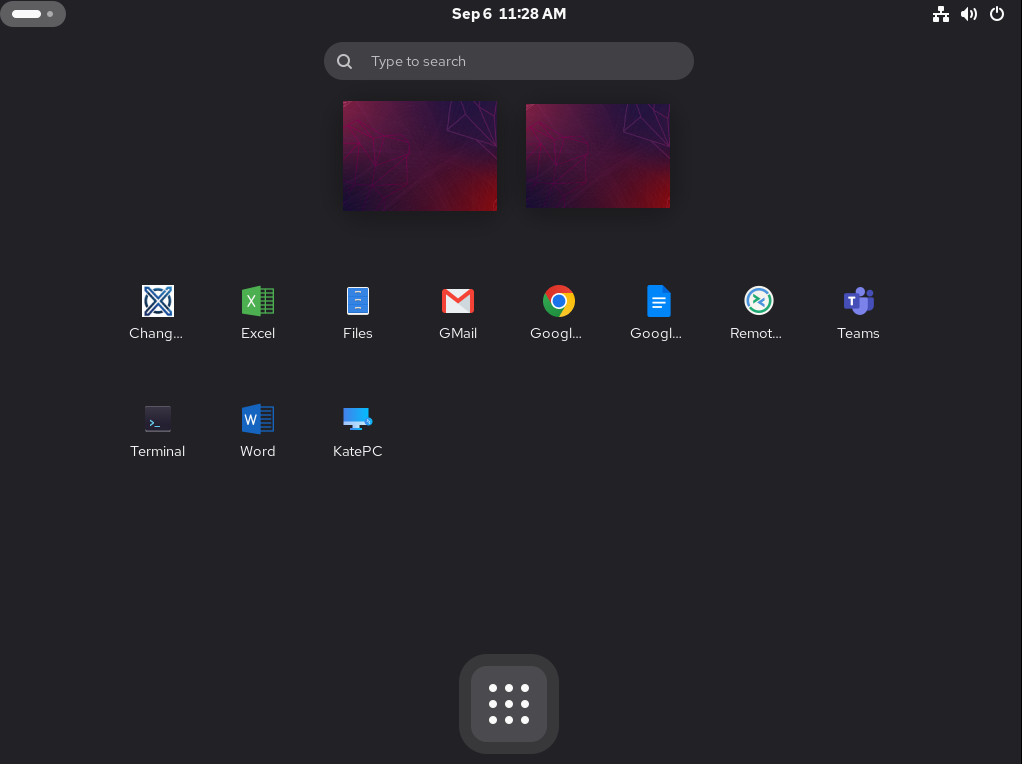
ZeroX Desktop Interface running on Rocky Linux 10
Understanding the ZeroX EcosystemZeroX separates endpoint hardware execution from centralized cloud control, with optional local streaming servers. Thin / ZeroClient EndpointInstalled directly on user PCs running Rocky Linux 10 Workstation. Converts hardware into a lightweight, secure endpoint managed remotely via API. Management Cloud ConsoleCentralized web management platform. Control user authorization, assign application profiles, enforce security policies, and monitor live systems globally. ZeroX Local RDP ServerStandalone local RDP server software that can be installed on-premise. Delivers internal or remote desktop sessions directly to connected endpoints whenever required. Flexible Operation ModesTailor client security and storage behavior depending on compliance requirements and workplace location. Thin Client ModeIn Thin Client mode, user configurations, personal settings, and desktop state are preserved locally on the workstation inside isolated home directories. Data remains strictly accessible only by the authorized user, offering a balance of personalization and desktop performance. Zero Client ModeIn Zero Client mode, absolute privacy and strict compliance are enforced—nothing stays on the local client machine. User configurations and session footprints are completely volatile, making this mode ideal for high-security or paranoid security operational environments. Secure Out-of-Office & Remote AccessZeroX natively integrates with enterprise VPN clients including OpenVPN and WireGuard. Enable workforce mobility so remote employees can securely connect and stream local internal RDP desktops or web applications from anywhere outside the office. Deployment & Installation GuideGet your thin clients operational in 4 simple steps. A
Request Cloud AccessRequest early access credentials to the ZeroX Centralized Cloud Management Platform. B
Install Rocky Linux 10 & Run InstallerInstall Rocky Linux 10 Workstation on any PC intended as a thin client. Open a terminal, log in as root, and execute the automated setup script: root@rocky10:~# wget https://www.cyberxnetworks.com/repo/zerox/rpms/EL10/x86_64/zerox_setup && chmod +x zerox_setup && ./zerox_setup
C
Register System API KeyRetrieve your unique API key from your Cloud Management Console interface and register your workstation to the platform. D
Deploy ApplicationsStart deploying application groups, web shortcuts, and remote desktop profiles directly to client endpoints. Centralized Web ManagementDesigned for organizations looking to move away from complex desktop maintenance to a unified, web-controlled endpoint infrastructure. Rocky 10 BaseBuilt directly on top of Rocky Linux 10 Workstation for complete system stability, security compliance, and performance. Cloud App DeploymentPublish web applications, custom tools, and virtual desktops remotely through the centralized ZeroX cloud interface. Pre-Built TemplatesOut-of-the-box configuration templates for Microsoft 365, Google Workspace, RDP servers, and custom Web applications. Group AllocationAssign specific Application Groups to different user profiles to streamline access control across departments. Dashboard Analytics
Live Endpoint Metrics & MonitoringTrack all registered systems, IP addresses, and active client connections in real time. The System-Wide Overview provides high-level resource visibility across your entire network.
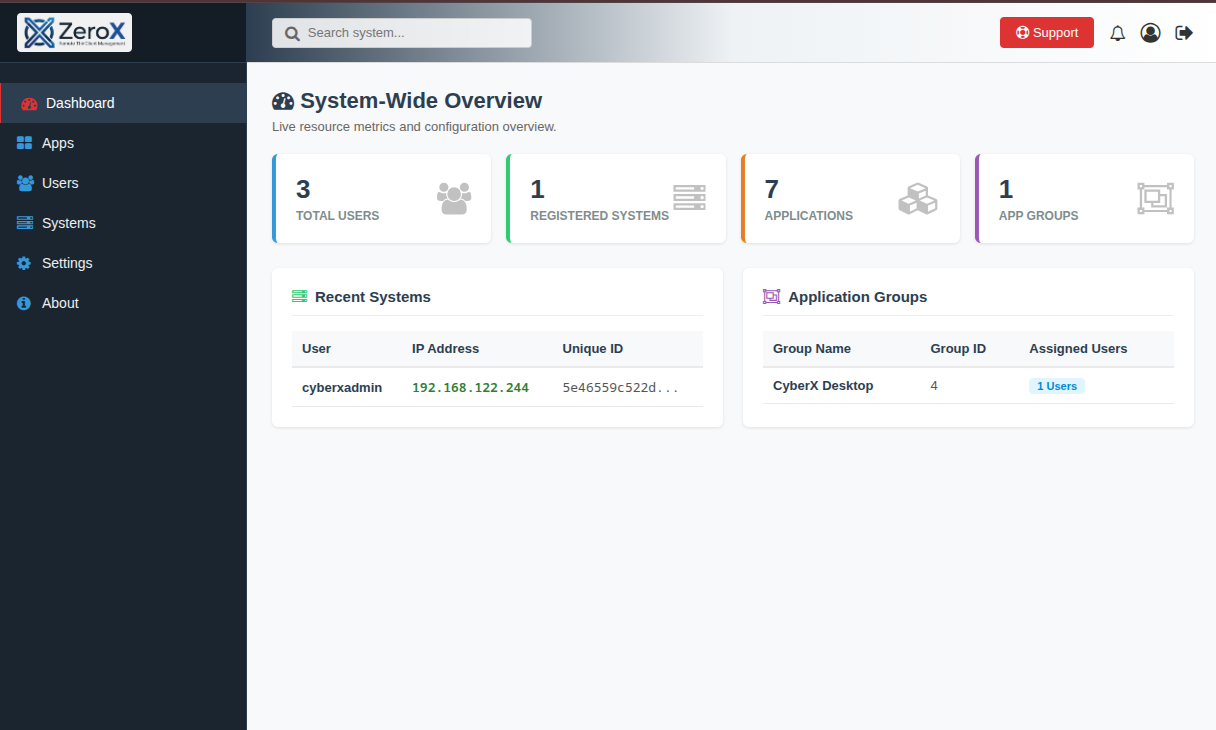
ZeroX System-Wide Overview Dashboard
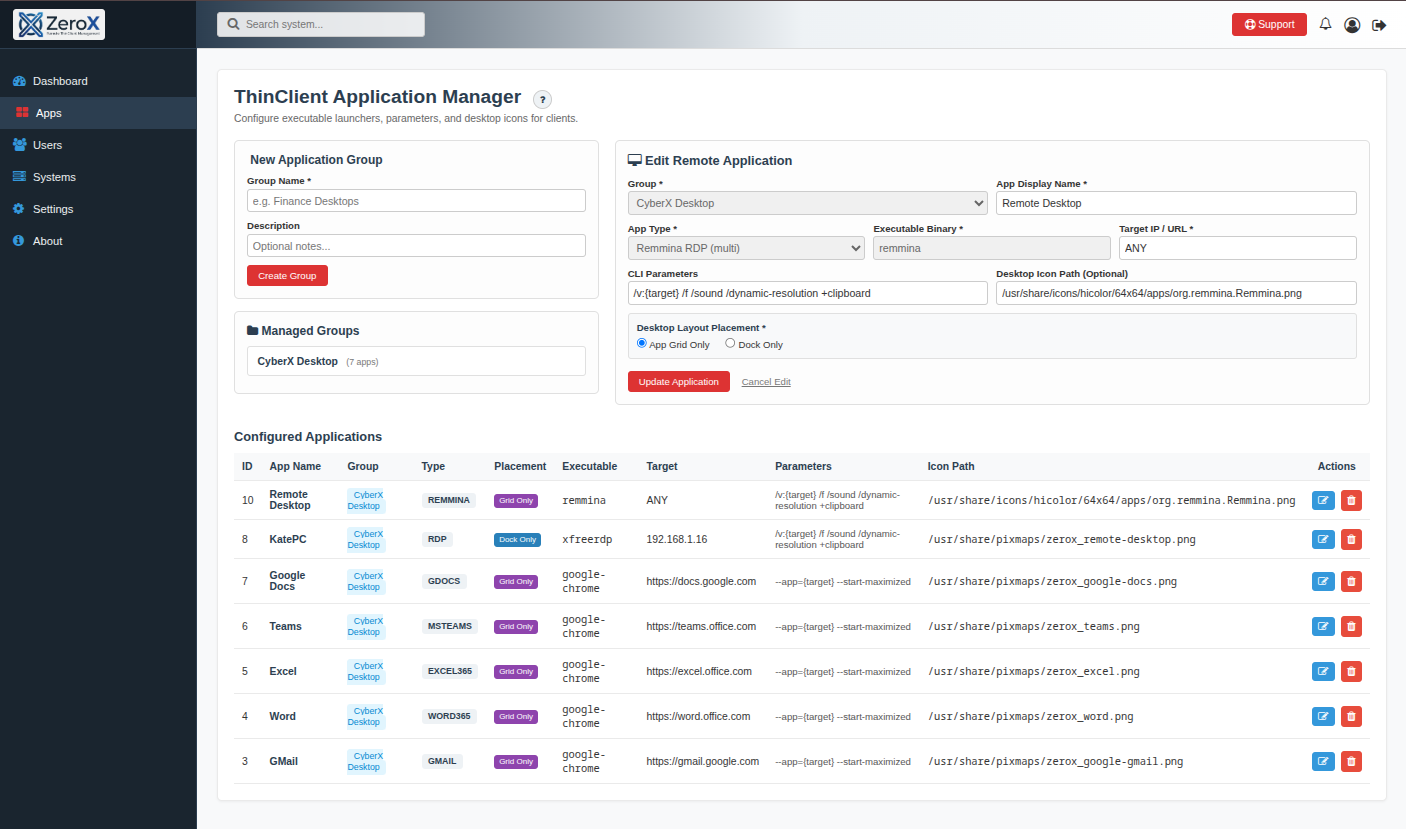
ThinClient Application Manager
App Configuration
Configure Launchers & Remote ApplicationsManage application launchers and publish them directly to end-user desktops. Support custom binary executables, xfreerdp RDP connections, and Google Chrome web shortcuts.
User Access Control
Directory Management & Expiration ControlsMaintain full control over user privileges, account roles, and system assignments. Set user account expiration dates and assign groups effortlessly.
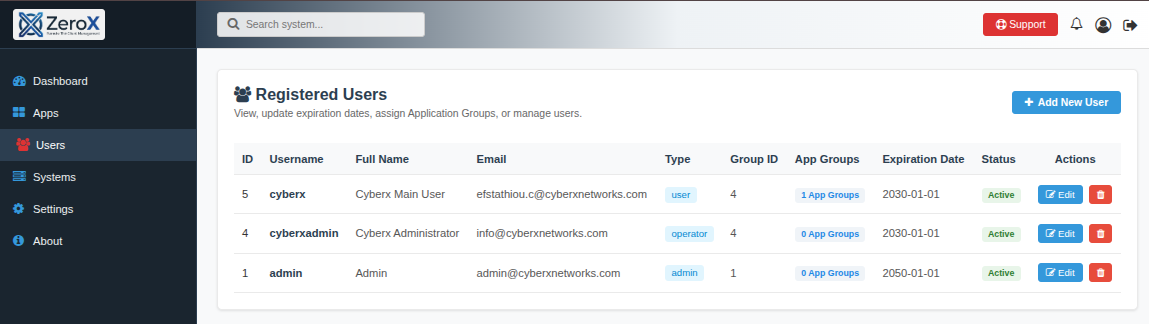
Registered User Directory
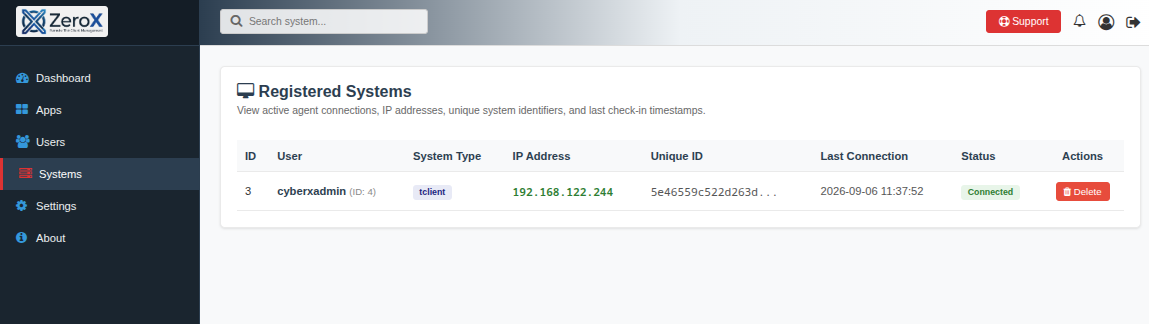
Registered Client Systems Panel
How ZeroX OperatesA simple, structured workflow to transition and maintain your thin client fleet. 1
GatherGathers telemetry, hardware data, and client status from deployed workstations in real time. 2
AnalyzeAnalyzes system resource usage, assigned application groups, and user permissions. 3
EvaluateEvaluates desktop layouts, RDP configurations, and security policies for each endpoint. 4
DeliverDelivers tailored application menus, Microsoft 365, and web tools directly to the client screen. Ready to Streamline Your Workstations?Free for up to 25 clients for both personal and commercial use. Convert your Rocky Linux 10 system into a managed thin client in minutes. |
|
Smart Linux ZeroClient
Transform Linux Desktops Into Smart ThinClientsConvert Rocky Linux 10 Workstations into cloud-managed, centralized thin clients with just one command. Eliminate legacy Windows workstation maintenance costs and simplify desktop management. 1 CommandInstant Conversion 100%Cloud Managed Rocky 10Enterprise Base
ZeroX Desktop Interface running on Rocky Linux 10
Understanding the ZeroX EcosystemZeroX separates endpoint hardware execution from centralized cloud control, with optional local streaming servers. Thin / ZeroClient EndpointInstalled directly on user PCs running Rocky Linux 10 Workstation. Converts hardware into a lightweight, secure endpoint managed remotely via API. Management Cloud ConsoleCentralized web management platform. Control user authorization, assign application profiles, enforce security policies, and monitor live systems globally. ZeroX Local RDP ServerStandalone local RDP server software that can be installed on-premise. Delivers internal or remote desktop sessions directly to connected endpoints whenever required. Flexible Operation ModesTailor client security and storage behavior depending on compliance requirements and workplace location. Thin Client ModeIn Thin Client mode, user configurations, personal settings, and desktop state are preserved locally on the workstation inside isolated home directories. Data remains strictly accessible only by the authorized user, offering a balance of personalization and desktop performance. Zero Client ModeIn Zero Client mode, absolute privacy and strict compliance are enforced—nothing stays on the local client machine. User configurations and session footprints are completely volatile, making this mode ideal for high-security or paranoid security operational environments. Secure Out-of-Office & Remote AccessZeroX natively integrates with enterprise VPN clients including OpenVPN and WireGuard. Enable workforce mobility so remote employees can securely connect and stream local internal RDP desktops or web applications from anywhere outside the office. Deployment & Installation GuideGet your thin clients operational in 4 simple steps. A
Request Cloud AccessRequest early access credentials to the ZeroX Centralized Cloud Management Platform. B
Install Rocky Linux 10 & Run InstallerInstall Rocky Linux 10 Workstation on any PC intended as a thin client. Open a terminal, log in as root, and execute the automated setup script: root@rocky10:~# wget https://www.cyberxnetworks.com/repo/zerox/rpms/EL10/x86_64/zerox_setup && chmod +x zerox_setup && ./zerox_setup
C
Register System API KeyRetrieve your unique API key from your Cloud Management Console interface and register your workstation to the platform. D
Deploy ApplicationsStart deploying application groups, web shortcuts, and remote desktop profiles directly to client endpoints. Centralized Web ManagementDesigned for organizations looking to move away from complex desktop maintenance to a unified, web-controlled endpoint infrastructure. Rocky 10 BaseBuilt directly on top of Rocky Linux 10 Workstation for complete system stability, security compliance, and performance. Cloud App DeploymentPublish web applications, custom tools, and virtual desktops remotely through the centralized ZeroX cloud interface. Pre-Built TemplatesOut-of-the-box configuration templates for Microsoft 365, Google Workspace, RDP servers, and custom Web applications. Group AllocationAssign specific Application Groups to different user profiles to streamline access control across departments. Dashboard Analytics
Live Endpoint Metrics & MonitoringTrack all registered systems, IP addresses, and active client connections in real time. The System-Wide Overview provides high-level resource visibility across your entire network.
ZeroX System-Wide Overview Dashboard
ThinClient Application Manager
App Configuration
Configure Launchers & Remote ApplicationsManage application launchers and publish them directly to end-user desktops. Support custom binary executables, xfreerdp RDP connections, and Google Chrome web shortcuts.
User Access Control
Directory Management & Expiration ControlsMaintain full control over user privileges, account roles, and system assignments. Set user account expiration dates and assign groups effortlessly.
Registered User Directory
Registered Client Systems Panel
How ZeroX OperatesA simple, structured workflow to transition and maintain your thin client fleet. 1
GatherGathers telemetry, hardware data, and client status from deployed workstations in real time. 2
AnalyzeAnalyzes system resource usage, assigned application groups, and user permissions. 3
EvaluateEvaluates desktop layouts, RDP configurations, and security policies for each endpoint. 4
DeliverDelivers tailored application menus, Microsoft 365, and web tools directly to the client screen. Ready to Streamline Your Workstations?Free for up to 25 clients for both personal and commercial use. Convert your Rocky Linux 10 system into a managed thin client in minutes. |